Custom Domain Name Resolution
Diode can be used to host content on a custom web2 Top Level Domain (TLD) - similar to github pages. This enables exciting possibilities of edge hosting for websites and other TLD-centric content.
For example, if you've registered a domain "yourname.com", you can host a website on "yourname.com" that is served from your diode client (e.g. from a Raspberry Pi, your laptop, or a server).
No static IP address or paid web host is required!
Important Note: Diode custom domains match the web2 name BEFORE the TLD suffix to the Diode BNS Name (web3 name). Example: yourname BNS entry matches yourname.com AND ALSO matches yourname.net (and every other yourname.<tld>). Therefore, it is "first come first serve" - the first yourname.<tld> web2 domain owner that registers yourname with Diode will be the operator of the web3 domain.
The registrable label is the BNS zone, so yourname.com and yourname.co.uk both use the BNS name yourname. Labels in front of that zone are PX: properties on the zone. See Subdomains.
Preparation
- Verify the TLD for your customer domain is a two, three, or four letter TLD (e.g.
.comis a three letter TLD). - Register the domain name as a BNS name with Diode and set the "Destination" of your BNS name to the address of the diode client hosting the content. For example, if your web2 domain is yourname.com then register "yourname" on the diode chain.
Or just on the command line:
diode bns -register yourname
3. Create an DNS A record to point your web2 domain to the IP address for diode.link (currently the IP is 45.79.224.174, but you can get the IP by opening a terminal window and typing ping diode.link). To do this, you'll have to go to your DNS provider's website and edit the DNS records.
porkbun.com example:
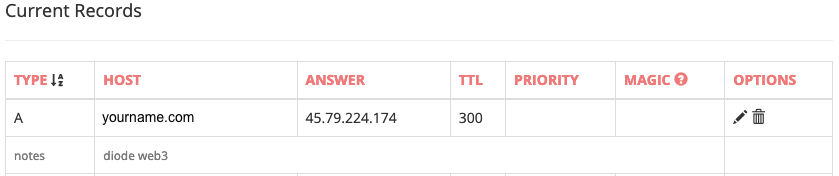
That's it! It will take up to an hour for your DNS changes to apply. So, don't forget to bring up your website and start serving your decentralized web!
In the example of yourname.com, you should be able to see your content at the URLS:
https://<clientaddress>.diode.link
Subdomains
Labels in front of the BNS zone are PX: properties on that zone. Diode names stay the same: division1.diode.link is the BNS name division1.
| Hostname | Lookup |
|---|---|
acme.com |
destinations registered on acme |
division1.acme.com |
PX:division1, then the destinations on acme |
west.division1.acme.com |
PX:west.division1, then PX:division1, then the destinations on acme |
division1.acme.co.uk |
PX:division1 on BNS acme |
division1.diode.link |
BNS division1 |
west.division1.diode.link |
BNS division1 |
A shorter key covers every name to its left unless a longer key is set. PX:division1 answers both division1.acme.com and west.division1.acme.com. The value is one 0x address. An empty value is treated as unset.
The leftmost label may still carry a mode and a port. Those sit outside the property key.
r-west-8080.division1.acme.com
That hostname looks up PX:west.division1, then connects to port 8080 in mode r.
Set the property with the Diode client that owns the zone:
diode bns -set-property acme:PX:division1=0x123229542c4afe8cd39da33f81bf698d57d3cb2a
Read and delete use -get-property and -delete-property. Command syntax, ownership, and block timing are in Working with blockchain names.
A DNS record for *.acme.com covers one label, such as division1.acme.com. west.division1.acme.com needs its own record, or a record for *.division1.acme.com.
On-demand certificates from diode gateway -edge_acme are issued for the hostname the browser used. Issuance requires the gateway to be reachable on port 443, the zone BNS name to resolve (acme for division1.acme.com), and the hostname to have at most three dots. west.division1.acme.com can be issued. west.division1.acme.co.uk cannot.
diode gateway -httpd_port 80 -httpsd_port 443 -secure -edge_acme -edge_acme_email ops@acme.com -certpath ./fullchain.pem -privpath ./privkey.pem